Ubuntu Linux: How to setup a VPN connection to a SonicWall router using Openswan and Pre-shared Keys (PSK)
Background
Pelago is a web design and development agency in Santa Barbara, California. Since our humble beginnings in August of 2000, we’ve seen the Internet landscape evolve exponentially in the last nine years. Our most current challenge as a creative and engineering agency is in embracing diversity in platforms and the inevitable shift towards the remote office. We use three different operating systems — Windows, OS X and Linux — on a daily basis. In addition to developing web-based project management software that is compatible with all three platforms, our designers and developers rely on them inside and outside of the office. Tunneling through the firewall from outside the office was our next requirement for embracing a diverse and distributed remote office.
Our SonicWall router makes it easy enough to establish a VPN connection using Windows. There is a client that can be downloaded from the SonicWall web site. What about other operating systems? Our developers often use Ubuntu Linux from home and required a way to VPN into the office. Once established, a VPN connection allows access to development servers, remote desktops, and other network resources inside the firewall; so you can see why it would be essential for the remote office.
The problem, as most Linux users out there already know, is that setting up a VPN connection in Ubuntu Linux is not very easy. After much trial and error, here is how we got the VPN working on Ubuntu Linux using Openswan.
Configuring the SonicWall Router
Login to your SonicWall router admin and make the following adjustments to the VPN settings.
-
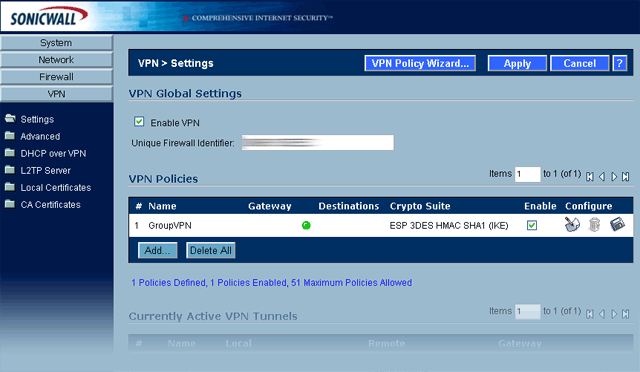
Click on the VPN link and note the Unique Firewall Identifier for your SonicWall router. You will need it later for the value
sonicwall.unique.identifier.
- Under VPN Policies, create or edit the ‘GroupVPN’ policy.
- Click on the General tab and set the following:
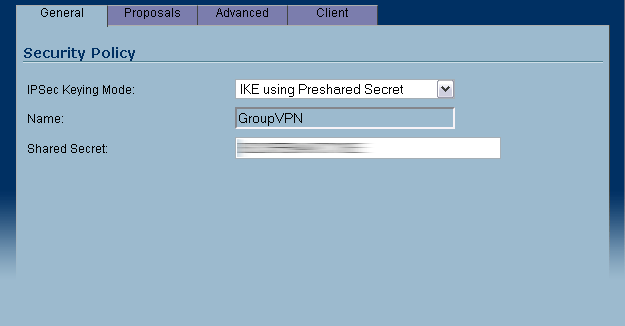
- IPSec Keying Mode: IKE using Preshared Secret
- Shared Secret: shared.secret.key (enter your secret key here)
-
Click on the Proposals tab and set the following:
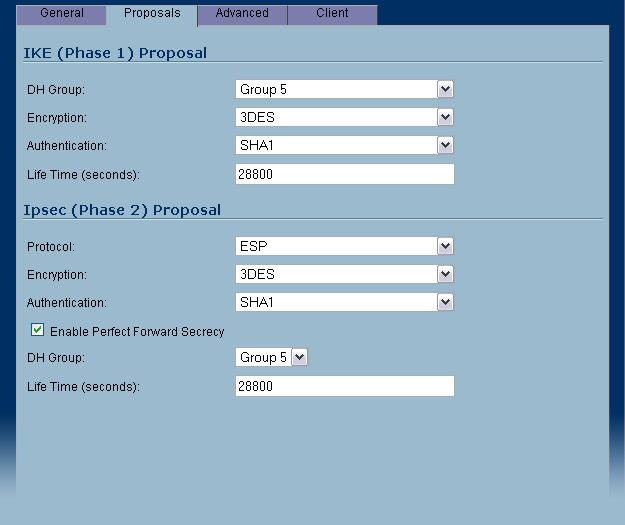
- IKE (Phase 1) Proposal
DH Group: Group 5
Encryption: 3DES
Authentication: SHA1 - Ipsec (Phase 2) Proposal
Protocol: ESP
Encryption: 3DES
Authentication: SHA1 - Enable Perfect Forward Secrecy (checked)
DH Group: Group 5
- IKE (Phase 1) Proposal
Installing Openswan
If you are using Ubuntu, open a terminal window and type in:
sudo apt-get install openswan
The install will ask you a few questions about how you want to set it up. Select the suggested default for each step. This will install Openswan and create the ipsec.conf and ipsec.secrets configuration files.
Configuring Openswan
Add the following connection parameters to your /etc/ipsec.conf file:
conn sonicwall
type=tunnel
left=192.168.2.31 #your IP
leftid=@GroupVPN
leftxauthclient=yes
right=xxx.xxx.xxx.xxx #IP address of your sonicwall router
rightsubnet=192.168.1.0/24 #gateway IP for your LAN. This will work for most
rightxauthserver=yes
rightid=@sonicwall.unique.identifier
keyingtries=0
pfs=yes
aggrmode=yes
auto=add
auth=esp
esp=3DES-SHA1
ike=3DES-SHA1
authby=secret
#xauth=yes
Update: After upgrading to Ubuntu 9.10 a few things changed in the conf file. First, I had to comment out ‘xauth=yes’ as it was throwing an error.
Add the following line to your /etc/ipsec.secrets file
@GroupVPN @sonicwall.unique.identifer : PSK "shared.secret.key"
Starting and stopping the VPN connection
Starting ipsec and opening the VPN connection
sudo ipsec setup ––start
sudo ipsec auto ––add sonicwall (note: if you change the configuration files, you'll need to run 'sudo ipsec auto ––replace sonicwall' to reload the file)
sudo ipsec whack ––name sonicwall ––initiate
Closing the VPN connection and stopping ipsec
sudo ipsec whack ––name sonicwall ––terminate
sudo ipsec setup ––stop
References
The following links were useful for getting the VPN connection up and running on Ubuntu Linux:
Openswan wiki page for SonicWall routers:
http://wiki.openswan.org/index.php/Openswan/SonicWall
SonicWall PDF instructions for using Agressive Mode and IKE with Pre-shared Keys
http://www.sonicwall.com/downloads
11/05/2010 Update:
We are now on our third SonicWall Router. The original 170 didn’t have enough features for us. It’s replacement, the 2040 recently went belly up. We are now running on the 2400. When we made the upgrade the Linux VPN stopped working. Checking the logs on the 2400 revealed a message stating the IDs did not match during Phase 1 IKE. It took some googling to figure out but the fix was to change the leftid so that it matched the name of the security policy. In this case, GroupVPN:
leftid=@GroupVPN
Another update you can make to the above configuration is to add the following lines to your configuration to allow VPN access from any IP:
Add interfaces
config setup
interfaces=%defaultroute
conn sonicwall
left=%defaultroute



August 31st, 2009 at 7:53 am
Update:
I’ve since grown weary of typing in the VPN commands line-by-line every time I want to start the VPN. So i’ve thrown the commands into a bash script with the following format. Now I just type ‘sh vpn.sh’ and everything boots up perfectly. Add the following to a bash script:
sudo ipsec setup ––start
sudo ipsec auto ––replace pelago
sudo ipsec whack ––isten
sudo ipsec whack ––name pelago ––initiate
September 14th, 2009 at 5:47 pm
I can not get this working. I do not know what I am doing wrong. There is very limited info on this subject, and the software company I am dealing with does not support linux. Please help!
Thanx
June 9th, 2010 at 11:47 pm
Found your how-to by Google (of course) and I cannot seem to get it to work even though I have replicated your setup exactly.
>> scott@scott-laptop:/etc$ sudo ipsec whack –name sonicwall –initiate
003 “sonicwall” #10: multiple transforms were set in aggressive mode. Only first one used.
003 “sonicwall” #10: transform (5,2,2,0) ignored.
002 “sonicwall” #10: initiating Aggressive Mode #10, connection “sonicwall”
003 “sonicwall” #10: multiple transforms were set in aggressive mode. Only first one used.
003 “sonicwall” #10: transform (5,2,2,0) ignored.
112 “sonicwall” #10: STATE_AGGR_I1: initiate
003 “sonicwall” #10: Informational Exchange message must be encrypted
Has you encountered this specific error and found a work around? (The sonicwall logs indicate a payload error and that the IKE ID’s are mismatched, but I see now way to configure that in the GVC)
June 11th, 2010 at 11:05 am
ed,
I have not encountered that error before, however, it sounds like you are heading in the right direction. The sonicwall logs always gave me what I needed to troubleshoot configuration issues. Second I would start googling the error messages you are receiving to see if anyone else has encountered them.
John
June 19th, 2010 at 7:17 pm
I am receiving the same errors as Scott. I have googled around and though I have found several people reporting similar problems I have not found a solution. This thread http://ubuntuforums.org/showthread.php?t=527423 seems to come close but after experimenting with various configs I still recieve the error. Has anybody found a solution?
June 19th, 2010 at 9:20 pm
I was able to get an XAUTH connection using the following document as a guide.
http://www.sonicwall.com/downloads/SonicOS_Enhanced_to_Openswan_Using_GroupVPN_with_XAUTH.pdf
However. after following the configurations specified I still received an error
“unexpected STRING [xauth]”
upon running
ipsec setup –start
It turns out that XAUTH is no longer a supported parameter. the solution was to remove the entry from the ipsec.conf file. Now authentication works flawlessly!
I have listed my settings below.
###Sonicwall Settings###
VPN–>Settings–>WAN Group VPN
General Tab
***Same as above
Proposals Tab
***Same as above EXCEPT uncheck “Enable Perfect Forward Secrecy”
Advanced Tab
-check “Require Authentication of VPN Clients via XAUTH”
-select authorized user group, I used “Trusted Users”
Clients Tab
Virtual Adapter Settings should be set to “None”
VPN–>Advanced
NAT Traversal should be checked
Users
Each authorized user must a member of the authorized group and have “LAN Primary Subnet” listed under the VPN Access Tab
###END Sonicwall Settings###
###BEGIN ipsec.conf ####
version 2.0
config setup
nat_traversal=yes
nhelpers=1
virtual_private=%v4:10.0.0.0/8,%v4:192.168.0.0/16,%v4:172.16.0.0/12
oe=off
protostack=netkey
conn sonicwall
type=tunnel
left=xxx.xxx.xxx.xxx #My IPv4 address
leftsubnet=$MYIPv4ADDRESS/32 #My IPv4 address/32
leftid=@GroupVPN
leftxauthclient=yes
right=mysonicwall.fqdn.com #sonicwall ip or fqdn
rightsubnet=192.168.xxx.0/24 #sonicwall subnet
rightxauthserver=yes
rightid=@MY.UNIQUE.IDENTIFIER
keyingtries=0
pfs=no
auto=add
auth=esp
esp=3des-sha1
ike=3des-sha1
authby=secret
aggrmode=yes
###END ipsec.conf ####
###BEGIN ipsec.secrets ####
@GroupVPN @MY.UNIQUE.IDENTIFIER : PSK “MY.PRESHARED.KEY”
###END ipsec.conf ####
June 19th, 2010 at 9:24 pm
One more thing. It is important that you tab all listed entries in ipsec.conf except “version 2.0″ “config setup” and “conn sonicwall”
June 19th, 2010 at 10:12 pm
I also believe it is important to have “@GroupVPN” as the leftid
June 20th, 2010 at 7:00 pm
Daniel,
Thanks for pointing out the xauth issue. I had the same issue a few months ago and had posted the following to the blog post above. However, it bears repeating:
Update: After upgrading to Ubuntu 9.10 a few things changed in the conf file. First, I had to comment out ‘xauth=yes’ as it was throwing an error. Second, I had to use my own static IP instead of %defaultroute. If you are using DHCP, %defaultroute may still work, but I have a static IP and had to change this.
October 10th, 2010 at 2:11 pm
I good solution with connecting Ubuntu to the SonicWall VPN is to use the SSL-VPN with version 4.0.665 of NetExtender. It works great with Ubuntu 10.10.
With this solution one does not have to configure anything on the client side only install the NetExtender.
November 5th, 2010 at 8:25 am
If anyone is experiencing errors like:
“Informational Exchange message must be encrypted” or that IKE IDs are mismatched, change the leftid to be @GroupVPN. Like this:
leftid=@GroupVPN
After upgrading our sonicwall to a 2400 I started having all of the problems described in the comments here and that is what fixed it.
Thank you everyone for your contributions to this subject!
May 12th, 2011 at 5:14 pm
There is an openswan VPN manager for network-manager in Ubuntu as of 10:04 IIRC..
May 12th, 2011 at 7:09 pm
It looks like Ubuntu may now support IPSec. The documentation, however, is not very clear on how to do it:
https://help.ubuntu.com/community/VPNClient
July 20th, 2011 at 7:08 am
Every now and then I take another stab at getting this to work but I never get past the part where there is a timeout after being prompted for username and password.
In the mean time, what works really well is this:
Set up a simple Windows XP VirtualBox inside of your linux machine. Make sure the box has two virtual network adaptors, 1 Bridged, and 1 Host-only.
Install the Sonic GlobalVPN client inside the Windows XP virtual box. Use the client to connect to the office LAN. Use Windows Connection Sharing to share this connection with the Host-Only network interface (you’ll need to use Virtual Box’s global settings to disable the DHCP server on that host-only virtual network, and you’ll need to set that interface in linux (it’s vbnet something, use ifconfig to see what it’s called) to get an IP address through DHCP. Finally, add some static routes in linux so that any connections to the office network’s family of IP addresses are routed through the IP address of the virtual box’s host-only interface.
Been using this since day one and the tunnel stays stable for days at a time, and my linux apps all have access to the office network. Every few weeks when I get in the right mood I try to get OpenSwan to work again and then give up after a few hours.
July 24th, 2011 at 2:17 pm
I have a question regarding the config file and secrets file.
Do the ids for GroupVPN and identifier get replaced by actual values and do I keepthe @-sign? I.e, say my policy is called WAN GjroupVPN and the id is 12345, what would the to files look like?
leftid=@WAN GroupVPN or leftid=WAN GroupVPN or leftid=@GroupVPN?
rightid=@sonicwall.unique.identifier or rightid=@12345 or rightid=12345
and similar question for secrets file.
Hope some can help.
August 4th, 2011 at 7:13 am
fedesen, the proper format would be:
leftid=@GroupVPN
October 10th, 2011 at 4:00 pm
cheap vpn…
[...]Ubuntu Linux: How to setup a VPN connection to a SonicWall router using Openswan and Pre-shared Keys (PSK) :: Pelago :: web design & development blog[...]…
February 6th, 2012 at 12:31 pm
Really nice,
very cool sharing.
http://www.TechLW.com
May 18th, 2009 at 12:02 pm
May 21st, 2009 at 8:04 am
June 30th, 2009 at 12:22 am
September 8th, 2009 at 4:01 pm
October 1st, 2009 at 6:51 am
References:
http://www.pelagodesign.com/blog/2009/05/18/ubuntu-linux-how-to-setup-a-vpn-connection-to-a-sonicwall-router-using-openswan-and-pre-shared-keys-psk/
http://www.sonicwall.com/downloads/SonicOS_Enhanced_to_Openswan_Using_GroupVPN_with_XAUTH.pdf
October 18th, 2009 at 11:15 pm
November 3rd, 2009 at 6:20 am
January 20th, 2010 at 3:08 pm
March 10th, 2010 at 9:31 am
May 7th, 2010 at 12:37 pm
[...] I see a lot of people are using OpenSwan to connect to a Sonicwall appliance from Ubuntu (pelago, openswan, [...]
June 19th, 2010 at 7:18 am
August 16th, 2010 at 6:20 am
August 16th, 2010 at 8:52 am
August 24th, 2010 at 7:37 pm
September 29th, 2010 at 11:59 pm
September 30th, 2010 at 1:59 am
October 7th, 2010 at 4:08 am
October 16th, 2010 at 5:54 am
November 2nd, 2010 at 7:14 am
November 4th, 2010 at 11:50 am
November 7th, 2010 at 3:09 pm
November 15th, 2010 at 12:01 am
[...] Spent a long time trying to figure this one out and thought others would be interested in this information: http://www.pelagodesign.com/blog/2009/05/18/ubuntu-linux-how-to-setup-a-vpn-connection-to-a-sonicwal... [...]
November 24th, 2010 at 5:14 pm
November 25th, 2010 at 2:20 am
November 30th, 2010 at 11:01 am
December 2nd, 2010 at 8:42 am
December 3rd, 2010 at 12:19 am
December 20th, 2010 at 2:15 am
December 22nd, 2010 at 8:53 pm
January 10th, 2011 at 11:16 pm
January 28th, 2011 at 10:07 am
February 4th, 2011 at 2:00 am
March 9th, 2011 at 3:26 am
April 2nd, 2011 at 8:41 am
April 13th, 2011 at 10:58 pm
May 5th, 2011 at 2:37 pm
May 7th, 2011 at 5:39 am
May 14th, 2011 at 9:02 am
July 8th, 2011 at 9:04 am
September 9th, 2011 at 4:27 am
September 12th, 2011 at 11:54 am
October 6th, 2011 at 11:07 am